SQLatte Documentation
Welcome to SQLatte - your friendly barista for data analytics! ☕
SQLatte transforms natural language questions into SQL queries, making database analytics accessible to everyone while maintaining enterprise-grade capabilities with its unique "barista personality."
What is SQLatte?
SQLatte is an AI-powered natural language to SQL analytics platform that combines the power of Large Language Models with your databases. Think of it as having a knowledgeable data analyst with a coffee shop personality who speaks your language and understands your data.
Getting Started
-
Quick Start
Get SQLatte running in 5 minutes with Docker or Python
-
Configuration
Configure databases, LLMs, and optional features via single YAML file
-
Features
Explore scheduling, analytics, insights, and runtime prompts
-
API Reference
REST endpoints, WebSocket API, and widget JavaScript API
-
Plugin System
Extend SQLatte with custom plugins (auth, integrations)
Core Philosophy
SQLatte is designed around conversational data analytics - making data accessible through natural dialogue while preserving the power of SQL underneath. The platform emphasizes:
- Widget-First Architecture: Embeddable anywhere, from simple websites to complex enterprise dashboards
- Optional Complexity: Start with basic NL-to-SQL, add enterprise features (auth, scheduling, analytics) only when needed
- Barista Personality: Friendly, approachable AI that makes data exploration feel natural
Key Features
AI-Powered Query Generation
- Natural Language to SQL: Ask questions in plain English, get optimized SQL queries
- Context-Aware Conversations: Remembers chat history and understands follow-up questions
- Multi-Table JOINs: Automatically detects relationships and creates complex joins
- Smart Schema Understanding: AI learns your database structure for better query generation
Multi-Database & Multi-LLM Support
- Database Providers: Trino, PostgreSQL, MySQL, Google BigQuery
- LLM Providers: Anthropic Claude (recommended), Google Gemini, Vertex AI
- Flexible Configuration: Switch providers without code changes via runtime config
Embeddable Widgets
- Standard Widget: Config-based authentication, shared database connection
- Auth Widget: Multi-tenant with per-user database credentials and session isolation
- Fully Customizable: Position, styling, fullscreen mode, and programmatic control
- CORS-Ready: Embed in any website across domains
Enterprise Features
- Scheduled Queries: Automate reports with flexible cron schedules (daily, weekly, monthly)
- Email Reports: CSV, Excel, HTML format delivery with customizable templates
- Query History & Favorites: Save, replay, and organize frequently-used queries
- Analytics Dashboard: Query performance metrics, usage statistics, and insights
- Admin Panel: Runtime configuration, prompt editing, connection testing
AI Insights Engine
- Automatic Analysis: AI-powered data pattern detection and trend analysis
- Context-Aware Insights: Considers temporal patterns and incomplete real-time data
- Hybrid Mode: Combines LLM reasoning with statistical analysis
- Smart Summaries: Identifies trends, anomalies, and actionable recommendations
Runtime Prompt Management
- Live Prompt Editing: Modify AI behavior through admin panel without code changes
- Four Customizable Prompts:
- Intent Detection (SQL vs chat determination)
- Barista Personality (conversational tone)
- SQL Generation (query construction rules)
- Insights Generation (data analysis patterns)
- Hot Reload: Changes apply immediately across all sessions
- Database Persistence: Save custom prompts for consistency
Data Visualization
- Auto-Generated Charts: Bar, line, pie charts from query results
- Interactive Charting: Click-to-chart from result tables
- Multiple Chart Types: Support for various visualization formats
- Chart.js Integration: Professional-quality visualizations
Deployment Options
Use Cases by Deployment Type
Best For: Internal tools, single-tenant apps, dashboards
- Uses backend config.yaml credentials
- No user authentication required
- Shared database connection
- Embed anywhere with
<script>tag - Perfect for company intranets
Best For: Multi-tenant SaaS, customer-facing analytics
- Per-user database credentials
- Session-based authentication
- Isolated connections per user
- Supports catalog/schema restrictions
- Ideal for SaaS products
Best For: Dedicated analytics portal, admin interface
- Full-featured unified interface
- Admin panel for configuration
- Schedule management across all users
- Analytics dashboard with metrics
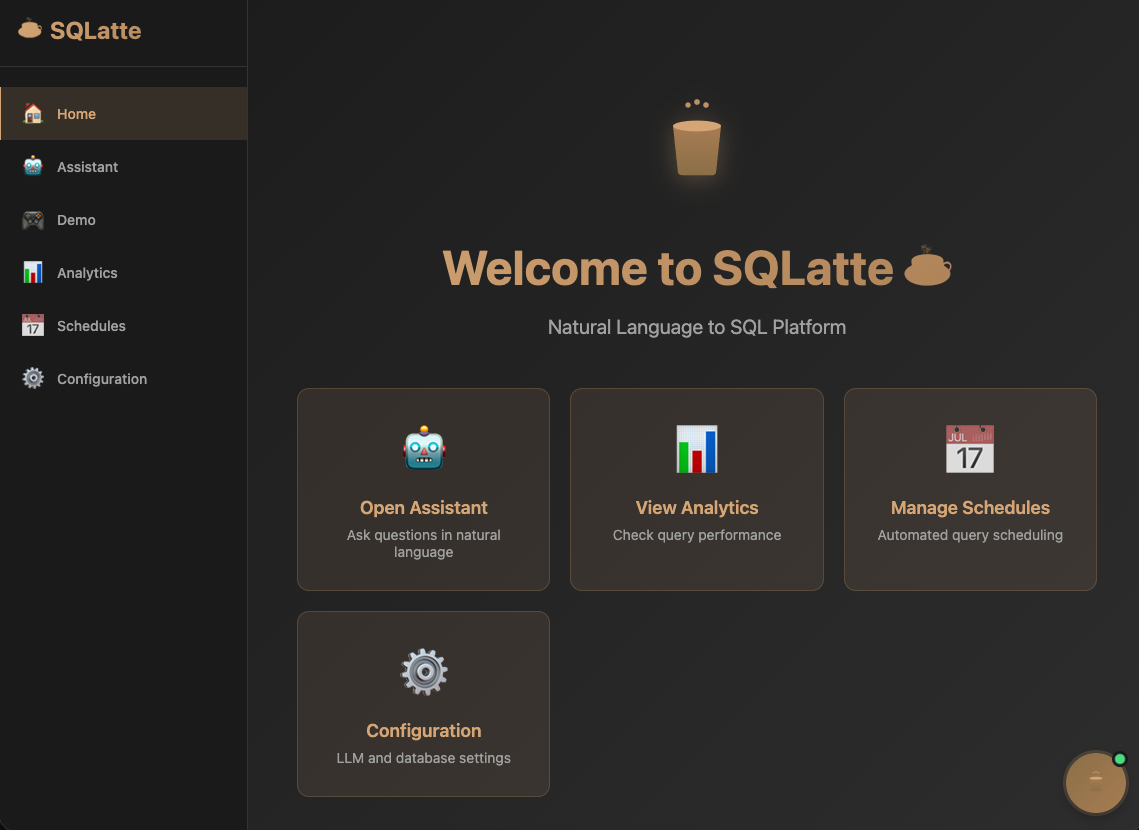
- Home, Assistant, Demo, Analytics, Schedules tabs
Supported Technologies
Database Providers
- Trino - Distributed SQL query engine (Hive, Iceberg, Delta Lake catalogs)
- PostgreSQL - Advanced open-source relational database
- MySQL - Popular relational database
- Google BigQuery - Serverless cloud data warehouse with service account auth
LLM Providers
- Anthropic Claude - Most advanced reasoning (Claude Sonnet 3.5/4 recommended)
- Google Gemini - Fast and efficient with free tier
- Vertex AI - Enterprise Google Cloud AI with advanced features
Storage Options
- In-Memory: Default, zero-config analytics and scheduling
- PostgreSQL: Persistent storage for enterprise deployments
- Runtime Switchable: Choose storage backend via config.yaml
Architecture Highlights
Conversation Memory
SQLatte maintains session-based conversation history, allowing context-aware queries:
"Show me top customers" → generates SQL
"What about last month?" → understands context, modifies previous query
"Export to CSV" → applies to current result set
Plugin Architecture
Extend functionality without modifying core code: - Authentication Plugin: Multi-tenant user isolation - Base Plugin Class: Hooks for routes, middleware, startup/shutdown - Custom Plugins: Add your own integrations (Slack, webhooks, custom auth)
Configuration Management
- Single config.yaml: All settings in one place
- Runtime Overrides: Change config via API without restart
- Hot Reload: Apply configuration changes immediately
- Database Persistence: Optional ConfigDB for distributed deployments
- Change History: Audit trail of all configuration modifications
Use Cases
Business Analytics
Enable non-technical teams to query data using natural language without learning SQL. Sales teams can ask "show me Q4 revenue by region" and get instant results with visualizations.
Data Exploration
Quickly explore datasets interactively with conversational follow-ups. Analysts can drill down with "what about Europe?" or "compare to last year" without writing new queries.
Automated Reporting
Schedule queries to run daily/weekly/monthly with automatic email delivery in CSV, Excel, or HTML formats. Perfect for stakeholder reports and KPI tracking.
Embedded Analytics
Add natural language querying to SaaS applications with either standard (shared DB) or auth (multi-tenant) widgets. Give your customers powerful analytics without building custom BI.
Enterprise BI
Complement existing BI tools with conversational interface. SQLatte works alongside Tableau, Looker, or PowerBI to provide ad-hoc query capabilities.
Multi-Tenant SaaS
Deploy Auth Widget for customer-facing analytics where each user connects to their own database with isolated sessions and credential management.
Real-World Example Workflows
Marketing Analytics
User: "Show me top 10 campaigns by ROI last quarter"
SQLatte: Generates SQL with JOINs across campaigns and metrics tables

User: "What about just email campaigns?"
SQLatte: Adds WHERE filter to previous query

User: "Chart it by month"
SQLatte: Displays interactive bar chart with monthly breakdown
Security Analysis
User: "Show attack attempts by IP address today"
SQLatte: Queries security logs with date filter

User: "Schedule this to run daily at 8am and email security team"
SQLatte: Creates schedule with email recipients

Result: Daily automated security reports delivered as Excel attachment
Getting Help
Community & Support
- GitHub Repository: github.com/osmanuygar/sqlatte
- Issues & Bugs: Report problems or request features via GitHub Issues
- Discussions: Ask questions, share use cases, and get help from the community
- Documentation: This comprehensive guide covers all features and configurations
Contributing
SQLatte is open source and welcomes contributions! Check the repository for: - Contributing guidelines - Development setup - Code style and standards - Feature roadmap
Enterprise Support
For enterprise deployments, custom features, or dedicated support: - Review the Architecture documentation - Contact via GitHub for partnership opportunities - Consider custom plugin development for specific integrations
What's New in SQLatte
Latest Updates (2026)
AI Insights Engine
Automatic data analysis with context-aware insights, hybrid LLM + statistical mode, and smart handling of incomplete real-time data.
Runtime Prompt Management
Edit all AI prompts through admin panel - intent detection, personality, SQL generation, and insights prompts - with database persistence and hot reload.
Google BigQuery Support
Native integration with service account authentication, project/dataset configuration, and optimized query execution.
Unified Dashboard
Tabbed interface with Home, Assistant, Demo, Analytics, Schedules, and Configuration sections for comprehensive platform management.
Enhanced Email System
Graceful degradation with mock mode when SMTP unavailable, HTML templates, rate limiting, and delivery tracking.
Admin Schedule Manager
Cross-user schedule management, execution history, email delivery logs, and bulk operations for enterprise deployments.
License & Attribution
SQLatte is released as open source software. Check the main repository for license details and attribution requirements.
When using SQLatte in production: - Maintain attribution in UI (already included in widgets) - Review license terms for commercial use - Consider contributing improvements back to the project
Ready to brew some queries? Start with the Installation Guide and have SQLatte running in 5 minutes! ☕
For a quick overview of all features, see the Configuration Overview.